

What Is Photo Retouching? Definition, Types & Process
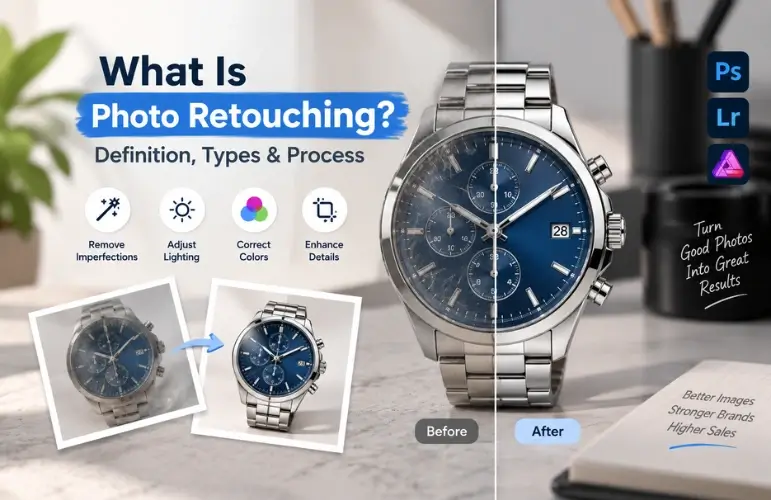
Photo retouching is the process of improving specific parts of a photo. It involves removing imperfections, correcting colors, refining details, and enhancing visual quality. Common examples include skin retouching, dust removal, object cleanup, color correction, and product enhancement.
The type of retouching and editing process can vary depending on the image and its purpose. In this guide, you’ll learn what photo retouching is, its main types, how the process works, and when professional retouching may be useful.
What Is Photo Retouching?
Photo retouching involves making targeted changes to specific areas of a photograph to improve its overall appearance. A retoucher may refine skin texture, remove temporary blemishes, clean up dust or scratches, correct unwanted reflections, adjust colors, or enhance fine details. The exact techniques depend on the type of image and the desired result.
For example, a portrait may need skin and hair refinement, while a product photo may require dust removal, reflection control, color correction, or shadow enhancement. The goal is to improve the image without making the subject look unnatural or significantly changing its original appearance.
What Does Photo Retouching Include?

Photo retouching can involve a range of adjustments depending on the image and its purpose. Common techniques include:
- Blemish and skin correction
- Dust, scratch, and fingerprint removal
- Color, exposure, and white balance correction
- Unwanted object and distraction removal
- Background cleanup
- Sharpening and detail enhancement
These techniques can be used individually or combined to improve a photograph while keeping the result natural and realistic.
Types of Photo Retouching

Different types of photography require different retouching techniques. From natural portrait enhancements to detailed product and commercial edits, the focus varies based on the visual requirements of each image.
Portrait Retouching
Portrait retouching focuses on improving a person’s appearance while keeping the result natural. Common adjustments include blemish removal, skin tone correction, stray hair cleanup, under-eye correction, teeth whitening, and subtle wrinkle reduction. It is commonly used for portraits, headshots, family photos, graduation pictures, and social media images.
Product Retouching
Product retouching improves the appearance and consistency of product photographs for e-commerce, catalogs, and advertising. It may include removing dust, scratches, fingerprints, unwanted reflections, and minor imperfections, along with color correction, sharpening, and shadow enhancement. The goal is to present the product clearly without changing its actual appearance.
Fashion & Beauty Retouching
Fashion and beauty retouching is used for editorial, advertising, cosmetics, and fashion photography. It can involve detailed skin retouching, hair cleanup, makeup enhancement, fabric refinement, color grading, and controlled lighting adjustments while maintaining realistic texture and proportions.
Real Estate & Interior Retouching
Real estate and interior retouching improves property photos by correcting exposure, white balance, perspective, and distracting elements. Editors may also enhance window views, clean up skies, remove unwanted objects, and balance interior lighting. Any sky replacement or major alteration should follow the relevant MLS and platform guidelines.
Jewelry Retouching
Jewelry retouching focuses on making small, detailed products look clean, sharp, and visually appealing. Common techniques include dust and scratch removal, color correction, reflection control, stone enhancement, metal cleanup, and careful sharpening while preserving the jewelry’s true shape and details.
Commercial & Advertising Retouching
Commercial and advertising retouching is used for campaign images, promotional materials, billboards, magazines, and branded content. It can combine multiple retouching techniques, such as skin and product refinement, object removal, and detailed lighting adjustments to achieve a specific creative or brand-focused result.
How Does Photo Retouching Work?

Our product photo retouching service follows a structured workflow, although the exact steps can vary depending on the image and the desired result.
Step 1: Image Assessment
The retoucher reviews the image to identify imperfections, lighting issues, distractions, and areas that need improvement. The image quality, resolution, and intended use are also considered before editing begins.
Step 2: Color and Exposure Correction
The editor adjusts exposure, brightness, contrast, white balance, and color tones to create a balanced and accurate appearance. These corrections provide a consistent foundation for detailed retouching.
Step 3: Detail Retouching
The retoucher works on the areas that need improvement using tools such as the Healing Brush, Clone Stamp, and masking. These tools help refine small details while keeping the image natural and realistic.
Step 4: Background and Object Cleanup
If needed, the retoucher isolates the main subject and cleans up distracting elements around it. The background can then be refined, adjusted, or replaced through background removal techniques.
Step 5: Final Review and Export
The finished image is checked for natural appearance, consistent color, and any remaining issues. The retoucher then makes final adjustments and exports the image in the right format and size for web, print, or other uses.
Photo Retouching vs. Photo Editing: What’s the Difference?
Photo editing and photo retouching both improve images, but they serve different purposes. Understanding the difference can help you choose the right approach for your photos and editing needs.
| Feature | Photo Editing | Photo Retouching |
| Focus | Overall image | Specific details |
| Tasks | Crop, resize, exposure | Blemish, dust & object removal |
| Editing Level | Basic to moderate | Detailed and precise |
| Use | Everyday & social media | Portrait, product & commercial |
Note: Photo retouching is often considered a type of photo editing, but it focuses more heavily on detailed, targeted corrections.
Tools Used in Professional Photo Retouching
Professional photo retouching uses different software and tools for detailed editing, color correction, and other image adjustments. The tools used can vary depending on the type of photo and the level of retouching required.
Adobe Photoshop
Adobe Photoshop is widely used for professional photo retouching. It supports skin retouching, background fixing, object removal, color correction, layer masking, and other advanced editing methods.
Adobe Lightroom
Adobe Lightroom is commonly used for adjusting brightness, contrast, white balance, and color tones. It also works well for RAW editing and batch processing large sets of photos.
Affinity Photo
Affinity Photo is a popular alternative to Photoshop. It offers tools for skin retouching, blemish removal, cloning, healing, and non-destructive editing.
Capture One
Capture One is favored by professional and commercial photographers for its color accuracy, strong RAW editing tools, and tethered shooting support for studio work.
Graphic Tablets
Graphic tablets help retouchers work with more precision and control. They make tasks such as skin retouching, hair fixing, masking, and detailed brushwork easier to manage.
Why Businesses Need Professional Photo Retouching

Professional photo retouching helps businesses present their products and brand in a clean, consistent, and professional way. Well-retouched images can improve visual quality, build customer confidence, and make products easier to understand.
- Builds Customer Trust: Professional images can make a brand look more reliable and credible.
- Improves Product Presentation: Retouching helps highlight important product details and create a polished appearance.
- Maintains Brand Consistency: Consistent colors, lighting, and image quality create a unified visual style.
- Saves Time and Money: Retouching can fix many image issues without requiring another photoshoot.
When Should You Retouch a Photo?
You may need photo retouching when an image has visible imperfections, distracting elements, or quality issues that affect its overall appearance. Common situations include:
- Skin blemishes or stray hairs
- Dust, scratches, or fingerprints
- Unwanted objects or background distractions
- Uneven lighting or colors
- Product imperfections or reflections
- Images that need a more polished, consistent look
Frequently Asked Questions
What Is Photo Retouching Used For?
Photo retouching is used to improve photographs by correcting imperfections, enhancing details, and refining elements such as skin, color, lighting, and backgrounds. It is commonly used for portraits, products, fashion, advertising, real estate, and commercial photography.
Is Photo Retouching the Same as Photoshop?
No. Photoshop is a software program, while photo retouching is the process of improving specific parts of an image. Photoshop is one of the tools commonly used for professional photo retouching.
How Long Does Photo Retouching Take?
Basic retouching may take a few minutes per image, while detailed portrait, fashion, or commercial retouching can take much longer. The time depends on the image quality, complexity, and required level of editing.
Can Smartphone Photos Be Retouched?
Yes. High-quality smartphone photos can be professionally retouched. RAW or high-resolution files generally provide more flexibility for detailed editing.
Does Photo Retouching Make Photos Look Fake?
Not necessarily. Professional retouching can preserve natural skin texture, colors, and other details while correcting unwanted imperfections. The result depends on how much editing is applied.
What File Format Is Best for Photo Retouching?
RAW files are generally preferred because they retain more image data for editing. High-resolution TIFF, PNG, or JPEG files can also work well, depending on the project.
How Much Does Photo Retouching Cost?
The retouching cost depends on the type and complexity of the retouching, the number of images, and the required turnaround time. Basic edits usually cost less than detailed commercial or high-end retouching.
Conclusion
Photo retouching improves photographs by correcting imperfections, refining details, and enhancing overall image quality. From product retouching to fashion, jewelry, and real estate images, the techniques vary based on the photo and its purpose. Understanding the different types, tools, and retouching processes can help you choose the right approach and create more polished, natural-looking images.
Need Professional Photo Retouching Services?
Explore Graphics Cycle’s Photo Retouching Service for polished, natural-looking images. Get professional retouching for products, portraits, fashion, and commercial projects. “Feel free to send us Quote”