


What is Background Removal? Process, Methods & Uses (2026)
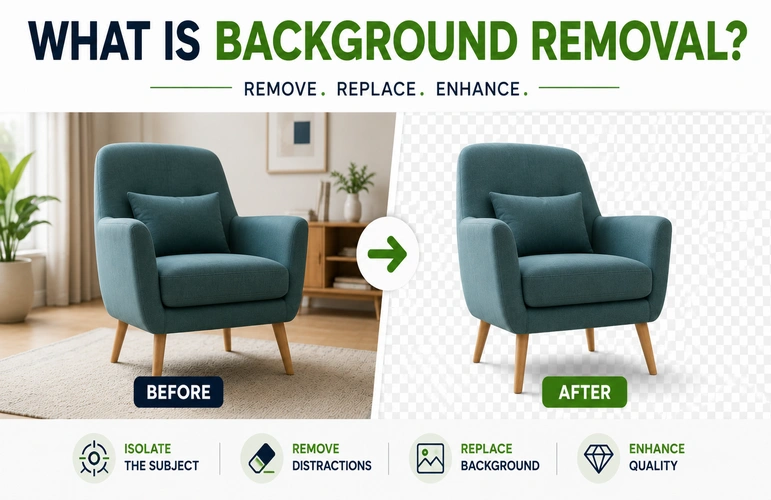
Background removal is the process of separating the main subject from the rest of an image and removing, replacing, or editing the background. It helps make the subject stand out and creates a cleaner, more focused image. Backgrounds can be removed manually in Photoshop or automatically with AI-powered tools.
What Is Background Removal?
Background removal is commonly used to create cleaner, more focused images for e-commerce, advertising, catalogs, websites, and social media. By separating the main subject from distracting surroundings, editors can present products or people more clearly and prepare images for different backgrounds and layouts. Depending on the image and its purpose, background removal can be used to:
- Isolate the subject from its surroundings.
- Remove distracting elements that take attention away from the subject.
- Add a solid-color or transparent background for a cleaner presentation.
- Prepare images for different platforms and designs, such as product listings, advertisements, catalogs, and websites.
How Does Background Removal Work? (Step-by-Step)

The background removal process varies depending on the image and editing method. However, most workflows follow four basic steps:
Step 1 – Subject Identification
The first step is to identify the main subject and determine where it ends and the surrounding background begins. AI-powered tools detect the subject automatically, while professional editors use selection tools and visual judgment to define the subject accurately.
Step 2 – Path/Mask Creation
Once the subject is identified, the next step is to create a precise path or mask around it. The technique depends on the subject and the level of detail required.
Path
In Adobe Photoshop, editors can use the Pen Tool to draw a precise vector path around subjects with clean, well-defined edges. This method works particularly well for products such as furniture, boxes, bottles, and electronics.
Mask
A layer mask controls which parts of an image remain visible or hidden without permanently deleting the original pixels. Masks are useful for subjects with soft, irregular, or detailed edges, such as hair, fur, and transparent objects.
Step 3 – Background Removal or Replacement
Once the subject has been isolated, the editor can remove the original background and either leave the area transparent or replace it with a new background.
Step 4 – Quality Check & Export
At a high zoom level, inspect the edges for halos, rough areas, missing details, or unwanted background pixels. Clean up any imperfections, then export the image in the required format, such as PNG for transparency or JPEG for standard web use.
Background Removal Methods Compared

Different images require different background removal techniques. For example, a product with clean, defined edges may be easy to process with a clipping path, while a fashion image with hair, fur, or transparent elements may require masking.
Manual Clipping Path (Pen Tool)
A clipping path is a manual technique in which an editor uses the Pen Tool to draw a precise vector path around the subject. It takes more time than automated methods but provides excellent control over hard, well-defined edges. It works particularly well for products such as furniture, boxes, bottles, and electronics.
Image Masking (For Hair, Fur, Transparent Objects)
Image masking is useful for complex subjects such as fine hair, fur, transparent objects, and intricate shapes. It uses masks, channels, and other advanced techniques to preserve fine details and create natural-looking edges.
AI-powered Tools
AI-powered background removal tools are fast and easy to use. Users can upload an image and automatically isolate the main subject within seconds. They work well for simple images and quick edits, but they may struggle with fine hair, transparent objects, complex shadows, or overlapping elements.
Which Method Should You Choose?
The right method depends on the subject, edge complexity, required accuracy, and project volume. For products with clean edges, AI tools or clipping paths may be sufficient. For images containing fine hair, fur, transparent materials, or complex details, advanced masking is often a better choice.
Types of Backgrounds You Can Get

After removing the original background, you can choose a new background based on the image’s purpose and the platform where it will be used. Common options include white, transparent, and custom or lifestyle backgrounds.
Pure White Background
A pure white background is widely used for e-commerce product images because it keeps attention on the product and creates a clean, consistent catalog appearance. Some marketplaces, including Amazon, have specific requirements for main product images, so sellers should always check the latest platform guidelines.
Transparent (PNG) Background
A transparent background has no visible background color or image behind the subject. It is commonly saved as a PNG file and allows the isolated subject to be placed over different colors, graphics, banners, or website layouts without displaying a rectangular background.
Custom/Lifestyle Background
Custom or lifestyle backgrounds place the subject in a realistic or custom setting, such as a kitchen, office, studio, or outdoor environment. This approach can help customers visualize how a product may look in real-world use while supporting a brand’s visual style.
Who Needs Background Removal Services?

Background removal is useful for businesses that need clean, consistent images for e-commerce stores, advertising, catalogs, websites, and social media. The technique can help businesses present products, people, vehicles, and properties more clearly across different marketing channels.
E-commerce & Marketplace Sellers (Amazon, Shopify)
For sellers on Shopify, Amazon, and other marketplaces, clean product images are essential for presenting products clearly. Removing background clutter creates a consistent catalog appearance and helps shoppers focus on product details. Sellers should also follow the specific image requirements of each marketplace.
Fashion & Apparel Brands
Fashion brands use background removal to keep attention on clothing, accessories, and models. Removing distracting surroundings can make colors, patterns, fabric textures, and fit easier to see. Clean backgrounds also help maintain a consistent appearance across product pages, catalogs, and promotional campaigns.
Jewelry & Product Photography
Jewelry images often contain intricate details, reflective surfaces, and small elements that require careful editing. Removing distracting backgrounds helps viewers focus on gemstones, metalwork, and other product details while creating a clean, polished presentation.
Real Estate & Automotive
Real estate agents and automotive businesses can use background editing to remove distracting surroundings or replace unsuitable backgrounds. For vehicle photos, it can create a cleaner background. For property photos, it can remove distractions and keep the focus on the building or space.
Background Removal vs. Clipping Path: What’s the Difference?
Background removal is the overall process of separating a subject from its background, while a clipping path is one manual technique used to achieve that separation. The best option depends on the subject’s edge complexity, required accuracy, and editing needs.
| Feature | Background Removal | Clipping Path |
| What It Is | Removing or replacing the background | Creating a path around the subject |
| Best for | People, products, and more | Products with clear edges |
| Hair & Fur | Can handle fine details with masking | Not ideal for fine strands |
| Flexibility | Can use different editing techniques | Mainly path-based editing |
| Speed | Depends on image complexity | Usually takes more time |
| Accuracy | Depends on the technique | Very accurate for clear edges |
| Large Batches | Good for bulk editing | Takes longer for large batches |
How Much Does Background Removal Cost?
Background removal services are typically priced per image, with the cost depending on the complexity of the subject, editing technique, image volume, and turnaround time.
| Image Type | Typical Price |
| Simple product images | 0.29–0.49/image |
| Standard e-commerce products | 0.50–0.99/image |
| Complex images | 1.00–3.00+/image |
| Bulk orders | Discounts may apply |
| Rush / same-day service | Additional fees may apply |
Why Choose a Professional Background Removal Service?
Professional background removal can be especially useful for businesses that need consistent, high-quality images at scale. While automated tools may work well for simple images, complex photos often require careful manual editing and refinement. Outsourcing to our background removal service can help businesses save time while maintaining consistent quality across large image batches.
Accuracy on Complex Edges (Hair, Fur, Glass)
Tricky elements such as fine hair, soft fur, and transparent glass require careful editing. Professional editors can manually refine masks around these areas to preserve fine details and create smooth, natural-looking edges.
Bulk/Batch Processing for Catalogs
E-commerce businesses often need to edit large numbers of product images. Professional editing teams can process images in batches while maintaining consistent backgrounds, dimensions, and overall quality across the catalog.
Fast Turnaround Time
Fast turnaround is important for businesses working with product launches, seasonal campaigns, or tight deadlines. A professional editing service can help reduce the editing workload and deliver finished images within an agreed turnaround time.
For businesses that need consistent, high-quality images at scale, professional background removal can be a practical alternative to handling every edit in-house. Graphics Cycle provides professional background removal services to help businesses save time, manage large image batches, and maintain consistent editing quality.
Frequently Asked Questions
Is background removal free?
Yes. Several free online tools offer basic background removal. However, free plans may have limitations such as lower output resolution, watermarks, or restricted editing features. Businesses that need high-resolution results or large-volume processing may benefit from paid tools or professional services.
What software is used for background removal?
Adobe Photoshop is one of the most widely used tools for professional background removal because it offers precise selection, the Pen Tool, layer masking, and advanced editing features. For faster automated results, tools such as Remove.bg and Adobe Express can also remove backgrounds with minimal manual work.
How long does background removal take?
AI tools can often remove a background within seconds. Manual clipping paths and advanced masking take longer and may require several minutes or more per image, depending on the subject’s complexity and the level of detail required.
Can AI fully replace manual background removal?
AI can handle many simple background removal tasks quickly, but it may struggle with fine hair, fur, transparent materials, overlapping objects, and complex lighting. For highly detailed or commercially important images, human review and manual refinement can still be valuable.
Conclusion
Background removal helps isolate a subject, reduce distractions, and create cleaner images for e-commerce, advertising, catalogs, websites, and other visual content. The right method depends on the image, required accuracy, and project volume.
While simple images can often be processed with basic tools, complex subjects and large image batches may benefit from professional editing. Graphics Cycle provides professional background removal services to help businesses maintain consistent, high-quality images at scale.