


Web App vs Mobile App: Which Does Your Business Need?
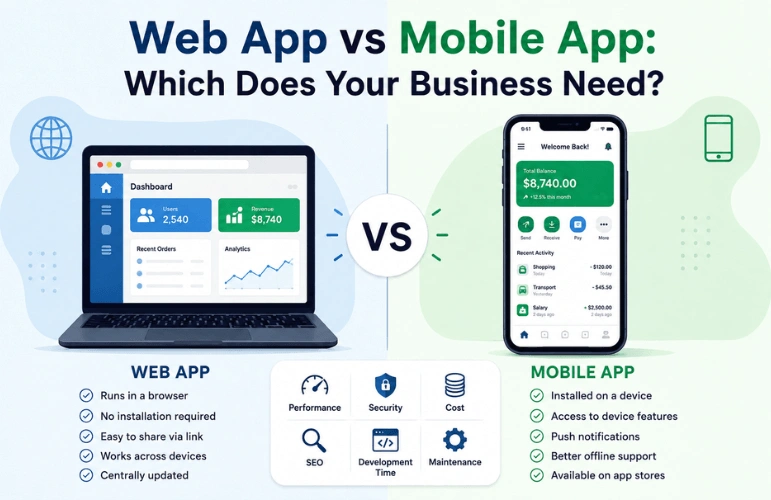
Choosing between a web app and a mobile app depends on your users, features, budget, and business goals. A web app runs in a browser and usually doesn’t require installation. It is easy to launch and update. A mobile app, on the other hand, is installed on a device and can offer better access to native features, offline functionality, and a more optimized mobile experience. There is no single best option. The right choice depends on what your product needs to do and how your customers will use it.
Web App vs Mobile App: Quick Comparison
Here’s a quick look at the key differences between web apps and mobile apps:
| Factor | Web App | Mobile App |
| Access | Browser-based | Installed on a device |
| Installation | Usually not required | Usually required |
| Initial Cost | Often lower | Can be higher |
| Development | Often faster to launch | May take longer |
| Offline Support | Limited | Stronger support |
| Updates | Centrally deployed | Requires app updates |
| Maintenance | Easier to manage | More work to maintain |
| Discoverability | Better search visibility | Relies on ASO |
What Is a Web App?

A web application is software that users access through a web browser. Unlike a traditional website, which may primarily present information, a web app allows users to interact with features, data, and services.
For example, an online banking platform lets users log in, check balances, transfer money, and manage their accounts. Web apps are generally accessed through a URL. So users usually don’t need to download and install them before getting started.
How Does a Web App Work?
A typical web app works through a combination of the browser, application server, backend services, databases, and APIs.
A simplified process looks like this:
- You open the web app through a browser.
- The browser sends a request to the application.
- The server processes the request and retrieves the required data.
- The application sends a response back to the browser.
- The browser displays the requested interface and information.
Modern web apps can also use caching and other web technologies to improve performance and support some offline features.
Key Characteristics of Web Apps
Web apps typically offer:
- Browser-based access
- URL-based sharing
- No installation required
- Responsive interfaces
- Centralized updates
- Works across devices
- Integration with web APIs
- Search-engine discoverability
Web App vs Website: What’s the Difference?
A website primarily provides information, while a web app is designed for interaction and tasks. For example, a company website may show its services, contact information, blog posts, and an About Us page.
A project management platform, on the other hand, may let users create tasks, assign team members, upload files, and track progress. Although they can overlap, their main purposes are different.
Examples of Web Apps
Common web app examples include:
- Gmail
- Google Docs
- Online banking platforms
- Project management tools
- E-commerce platforms
- Online booking systems
- CRM systems
- SaaS platforms
What Is a Mobile App?

A mobile app is software designed to run on smartphones or tablets. Users download and install mobile apps from platforms such as the Apple App Store or Google Play. Mobile apps can use device features such as the camera, GPS, and local storage, depending on the operating system and permissions.
How Does a Mobile App Work?
A typical mobile app works like this:
- You download the app from the App Store or Google Play.
- The app installs on your device.
- You open the app and sign in or create an account.
- The app connects to the server when needed.
- The app uses device features to work properly.
Many mobile apps can also store some data locally, allowing selected features to remain available when the internet connection is unavailable.
Key Characteristics of Mobile Apps
Common characteristics of mobile apps include:
- App store distribution
- Installation required before use
- Access to device hardware and sensors
- Push notifications
- Offline functionality
- Platform-specific design (iOS or Android)
- Local data storage
Mobile App Development Approaches
Mobile apps can be broadly divided into two development approaches.
1. Native Apps
Native apps are built specifically for one operating system, such as iOS or Android. They are designed to work closely with that platform and can use its device features more directly. For example, an iPhone app built specifically for iOS is a native app.
2. Cross-Platform Apps
Cross-platform apps are built to work on multiple operating systems using much of the same code. This can save developers time because they don’t have to build everything from scratch for each platform.
For example, Flutter and React Native let developers build apps for both iOS and Android using shared code. You can also learn more about native, hybrid, and web app development to compare the main development approaches.
Examples of Mobile Apps
Examples include:
- Spotify
- Google Maps
- Fitness tracking apps
- Food delivery apps
- Mobile banking apps
- Mobile games
Web App vs Mobile App: Key Differences

Web and mobile apps differ in several important ways. These differences affect development, distribution, performance, maintenance, discoverability, and the overall user experience. Here are the key differences that affect your decision.
1. Accessibility and Installation
Web apps are easy to access because users can open them in a browser without installing anything. Mobile apps, however, usually require users to download and install them first.
If you want users to access your product quickly, a web app may be more convenient. A mobile app is better when you want users to keep the app installed for regular access.
2. Development Cost
Development cost depends on the app’s complexity, features, platforms, and technical requirements. A web app can often be less expensive initially because a single web application can serve users across many devices and operating systems.
Mobile apps can cost more when separate development, testing, and updates are needed for iOS and Android. However, cross-platform frameworks can reduce duplicated work for some mobile projects.
3. Development Time
Web apps can often reach users faster because they can be deployed centrally without waiting for users to install a new version. Mobile development may require additional work for iOS and Android, different screen sizes, device compatibility, app-store submission, platform-specific testing, and release management.
Cross-platform development can shorten some of this work, but it does not eliminate all platform-specific considerations. For businesses prioritizing a faster launch, web development can be a practical option.
4. Performance
Performance depends on several factors. These include application architecture, device capability, browser type, network speed, and the amount of workload the app handles.
Native mobile apps often perform better for intensive processing, complex animations, advanced graphics, and deep hardware integration. Modern web apps can perform very well for business tools, dashboards, and SaaS products.
5. Offline Functionality
Traditional web apps commonly depend on network connectivity, but modern web technologies have changed this picture. Progressive Web Apps and other web technologies can cache selected resources and data, allowing some features to work offline or with poor connectivity.
Mobile apps can also be designed around offline-first experiences and synchronize data when connectivity returns. For products that rely heavily on offline access, mobile apps are often the better choice.
6. Device Features and Hardware Access
Mobile apps generally have deeper access to device features such as the camera, GPS, microphone, sensors, Bluetooth, biometrics, and push notifications. Web browsers also support many device features through web APIs, but access can vary by browser, operating system, and permissions.
If your product depends heavily on GPS, advanced sensors, AR, or specialized hardware, a mobile app is often the better choice.
7. Updates and Maintenance
Web apps often make updates easier because changes are deployed centrally. When the development team releases a new version, users can typically access the latest version when they load the application.
Mobile apps usually distribute updates through app stores. Users may update immediately, automatically, or later, depending on their settings and platform. If your product changes frequently and you want users to receive updates quickly, a web app can simplify deployment.
8. Discoverability
Web apps can have an advantage in search visibility because their public pages can be crawled and indexed when they are properly built and optimized.
Mobile apps rely more heavily on app-store discovery and App Store Optimization (ASO). They can also be promoted through websites, search advertising, social media, and other channels. If organic search is a major acquisition channel, a web app may offer a stronger advantage.
9. Security
Security depends on how an app is designed, built, and maintained rather than simply whether it is a web or mobile app.
Mobile operating systems provide features such as sandboxing, encryption, and biometric authentication. Web apps can also be highly secure with proper authentication, encryption, secure APIs, server protection, and regular updates.
Both can be secure when built properly. The right choice depends on your security requirements and implementation.
10. Distribution and App Store Requirements
A web app can be published on a server and accessed through a URL. A mobile app usually goes through an app store before users can download it. This adds requirements such as store guidelines, app reviews, updates, and platform-specific rules. Web apps therefore have a simpler path to public access.
Which Should You Build: Web App or Mobile App?

Choose a web app when broad access, faster deployment, SEO, and centralized updates are priorities. Choose a mobile app when your product depends on offline use, push notifications, frequent engagement, or deeper access to device features.
Choose a Web App If:
- You need broad device access.
- You want to launch quickly.
- Your budget is limited.
- SEO is important.
- You expect frequent updates.
- You are testing an MVP or new product idea.
Choose a Mobile App If:
- Users interact with the product frequently.
- Push notifications are important.
- Users need the app to keep working without internet.
- GPS or navigation is central to the product.
- Device features such as cameras, Bluetooth, or NFC are important.
- Deep operating-system integration is required.
Can You Start With a Web App and Build a Mobile App Later?
Yes. Starting with a web app can help you validate demand, test your product, and identify the features users need most. If users later need deeper device integration, offline access, or frequent mobile engagement, you can develop a mobile app.
Your backend, APIs, authentication, and business logic may be reusable, but the mobile experience may still need dedicated design and development.
Frequently Asked Questions
Which is better, a web app or mobile app?
It depends on how users will engage with your product. A web app is often better for occasional visitors and search-driven traffic. A mobile app is often better for daily use, notifications, offline access, or camera and GPS features. Many businesses eventually use both.
Is a web app cheaper than a mobile app?
A web app can cost less initially because one version can serve users across different devices and operating systems. However, the actual cost varies based on the app’s features, complexity, and technical requirements.
Is a mobile app faster than a web app?
Native mobile apps can perform better for demanding tasks and deep device integration. However, performance depends on the app, device, network, and how the software is built.
Can a web app work offline?
Yes, with Progressive Web App (PWA) technology and Service Workers, a web app can store essential files and data locally, allowing it to function offline or in low-network conditions. However, for complex, fully offline-first workflows, native mobile apps still hold an advantage.
Can a web app access phone features?
Yes. Modern browsers can access some device features through web APIs, such as cameras, location, microphones, and sensors. Access depends on the browser, operating system, and permissions.
Should I build a web app or mobile app first?
Start with a web app when you want to validate an idea quickly, and your core features work well in a browser. Choose a mobile app first when the product depends on device-specific features such as GPS, Bluetooth, NFC, push notifications, or advanced camera capabilities.
Conclusion
Web and mobile apps solve different business needs. Web apps are well-suited to products that need easy access, search visibility, and centralized deployment. Mobile apps make more sense when the experience depends heavily on device capabilities or regular mobile engagement. Before choosing, identify the features your users need most and select the platform that can deliver them effectively.
Not sure which platform fits your business? Explore our App Solutions and let Graphics Cycle help you choose and build the right solution for your product.